# Get Started

This guide will walk you through the steps to get started with VerifyLink.io, helping you eliminate broken links, expired offers, and access restricted links.

{% hint style="info" %}
**`Quick Info :`** Make sure to select the subscription plan that best suits your needs. If you choose the **API plan**, you won't have access to the web interface for testing your tracking links; for that, you'll need to purchase a **Web plan**. If you're unsure which plan is right for you, you can opt for the **Pay As You Go** plan.
{% endhint %}

## How does it work?

VerifyLink.io tests your tracking links across various devices and geographical locations, including country, state, city, and even zip code. Our system supports testing on different operating systems and OS versions, including custom versions. To further enhance the accuracy and reduce the chances of blocking, we offer timezone and device language customization.

<figure><img src="https://1755643073-files.gitbook.io/~/files/v0/b/gitbook-x-prod.appspot.com/o/spaces%2FjVQ4i1KqNDyGnm3ZWyeT%2Fuploads%2FEGtVLkV51CaRCXjXnUoe%2FScreenshot%20from%202024-05-24%2013-07-02.png?alt=media&amp;token=b471d4c7-93fd-4d8d-b82e-babad44621dd" alt=""><figcaption><p>verifylink.io preview</p></figcaption></figure>

Our user-friendly interface makes VerifyLink.io easy to use. Our system delivers results 30% faster and 20% more accurately than any other on the market.

## I am ready to start

Cool, let's start by creating an Account on Verifylink.io, click [here](https://verifylink.io/register)

{% hint style="success" %}
**Good to Know :** Leverage the power of our advanced AI-powered system to test your tracking links more accurately than any other. We are 30% faster and 20% more accurate than competitors, offering more customization features. Our advanced AI eliminates most errors, providing you with the best possible results.
{% endhint %}


# Account Setup

Let's start by setting up your account

## Initiate Test

If you are on Web Plan, You can start testing links by logging in to your account

<figure><img src="https://1755643073-files.gitbook.io/~/files/v0/b/gitbook-x-prod.appspot.com/o/spaces%2FjVQ4i1KqNDyGnm3ZWyeT%2Fuploads%2FqTx3MfROF1v0V5SNFak3%2FScreenshot%20from%202024-05-24%2016-30-49.png?alt=media&amp;token=3a6eeb72-56d1-45ec-a4b0-1d82a4ffafff" alt=""><figcaption><p>Web Test Preview of Verifylink.io</p></figcaption></figure>

## Grab API KEY

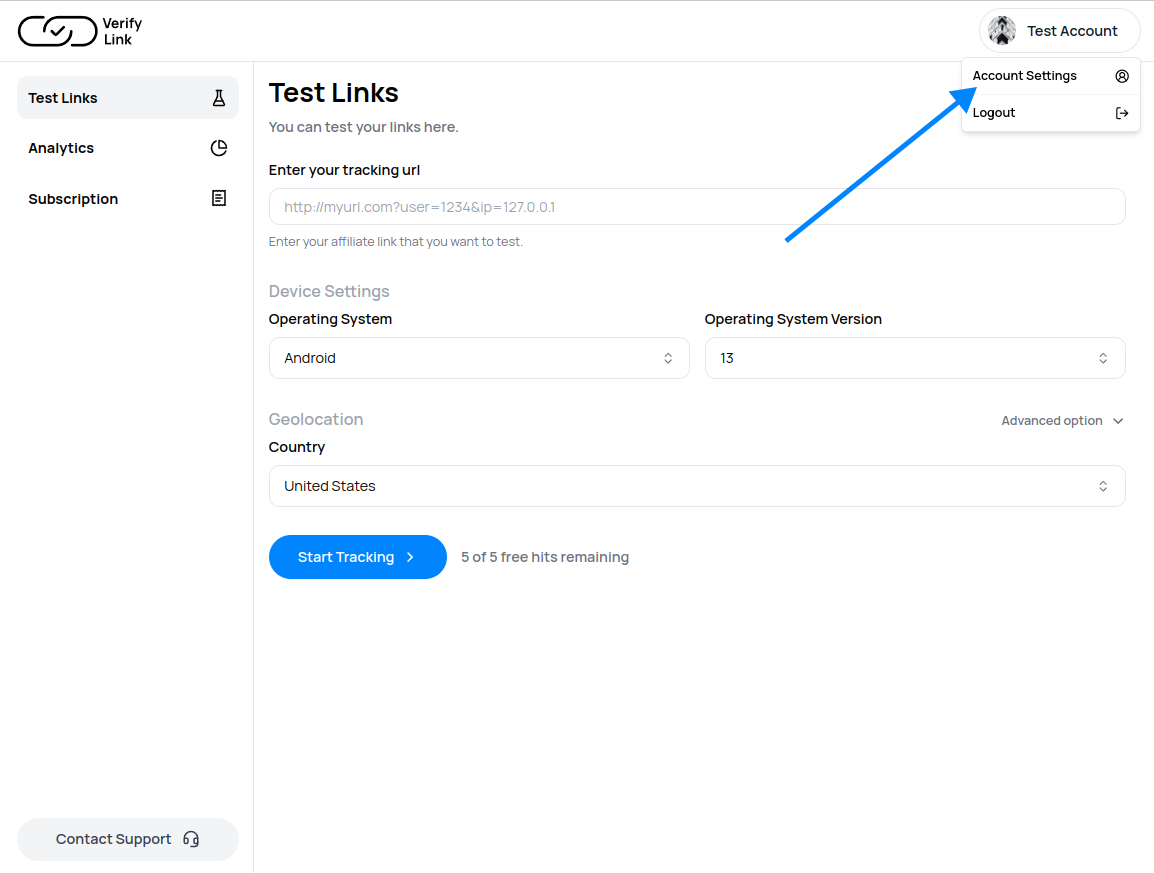
If you just purchased your API Plan, You can Follow this step to Grab Your API KEY

<figure><img src="https://1755643073-files.gitbook.io/~/files/v0/b/gitbook-x-prod.appspot.com/o/spaces%2FjVQ4i1KqNDyGnm3ZWyeT%2Fuploads%2FngSrwCp8iCHVREccpl2v%2FGroup%202.png?alt=media&amp;token=4e482b39-5ad5-4592-a5d0-eee102a3f4b2" alt=""><figcaption><p>Verifylink.io Account Setting</p></figcaption></figure>

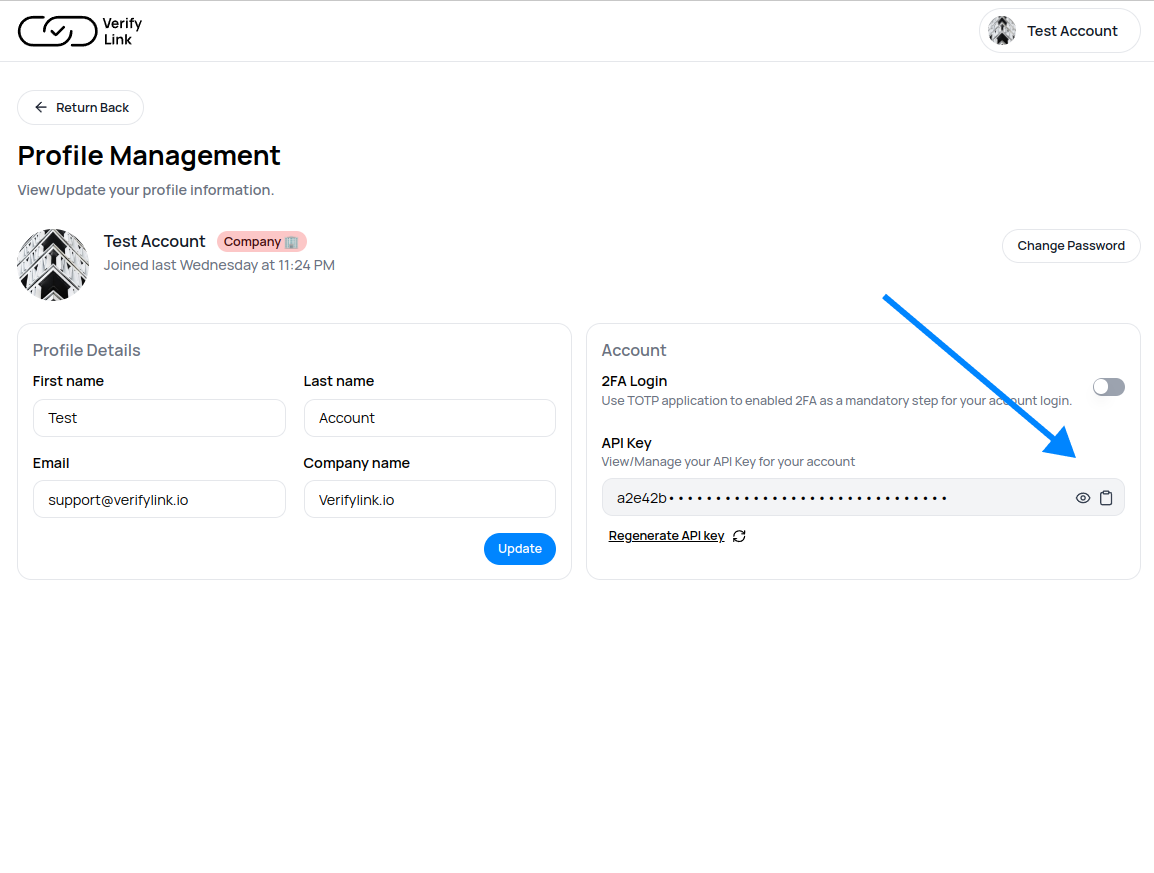
#### Now Copy API Keys

<figure><img src="https://1755643073-files.gitbook.io/~/files/v0/b/gitbook-x-prod.appspot.com/o/spaces%2FjVQ4i1KqNDyGnm3ZWyeT%2Fuploads%2FiOLXfjunW6pjTOucgGp9%2FGroup%203.png?alt=media&amp;token=5b2d298e-529e-44f6-905f-0a39635cca81" alt=""><figcaption><p>Copy API Key from Verifylink.io</p></figcaption></figure>


# Start with API

Our API is simple to start with, Utilize this api to test your tracking link direcly on your servers, this API is ment for server-to-server, so make sure you don't use this on client side (browser).

## Start Testing

{% hint style="info" %}
**Note :** You can follow this guide to grab your API Keys, click [here](/account#grab-api-key)
{% endhint %}

Base endpoint : `https://verifylink.io`

## Create a request

<mark style="color:green;">`POST`</mark> `/api/v1`

The request should be a POST with the appropriate headers and body in raw format.

**Headers**

| Name         | Required | Value                |
| ------------ | -------- | -------------------- |
| Content-Type | true     | `application/json`   |
| apiKey       | true     | xxxxx-xxxxxxx-xxxxxx |

**Body**

<table><thead><tr><th>Name</th><th>Type</th><th width="102">Required</th><th>Description</th></tr></thead><tbody><tr><td><code>url</code></td><td>string</td><td>true</td><td>https://example.com/offer?id=123</td></tr><tr><td><code>os</code></td><td>string</td><td>true</td><td>android or ios or desktop</td></tr><tr><td><code>version</code></td><td>string</td><td>true</td><td>This is OS version, it should be 13 if you want Android 13 or 17.5 if you want IOS 17.5</td></tr><tr><td><code>country</code></td><td>string</td><td>true</td><td>it should be two-letter country codes of country, for eg : US, GB</td></tr><tr><td><code>state</code></td><td>string</td><td>false</td><td>This should be state code, for New York, it should be NY</td></tr><tr><td><code>city</code></td><td>string</td><td>false</td><td>This should be city name in small characters for eg : newyork</td></tr><tr><td><code>zipcode</code></td><td>string</td><td>false</td><td>This should be valid zip code, for eg : 10013</td></tr><tr><td><code>isScreenshot</code></td><td>boolean</td><td>false</td><td>This should be either true or false</td></tr></tbody></table>

{% hint style="warning" %}
Note : If you set "isScreenshot" to true, each request will cost **10 credits**. Only enable this option if necessary.
{% endhint %}

**Response**

{% tabs %}
{% tab title="200" %}

```json
{
    "message": "Process completed",
    "redirectUrls": [
        "https://surl.li/twxos",
        "http://surl.li/twxos",
        "https://bitly.cx/AB4W",
        "https://shorturl.at/2E86Q",
        "https://www.shorturl.at/2E86Q",
        "https://verifylink.io/"
    ],
    "screenshots": [],
    "statusCodes": [
        307,
        301,
        301,
        302,
        301,
        302
    ],
    "content": "<!DOCTYPE html><html lang=\"en\" class=\"nprogress-busy\" style=\"\"><head><meta charset=\"utf-8\"><meta name=\"viewport\" content=\"width=device-width\"><link rel=\"icon\" type=\"image/png\" href=\"/assets/images/site/favicon.png\"><meta name=\"title\" content=\"verifylink.io\"><meta name=\"description\" content=\"Verfiylink.io is the affiliate link testing application for affiliate marketers to test affiliate links based on various criteria like geolocation, device etc.\"><meta name=\"keywords\" content=\"link testing pla",
    "serverfailure": false,
    "destination": "website"
}
```

{% endtab %}

{% tab title="400" %}

```json
{
    "message": "Missing required parameters"
}
```

{% endtab %}
{% endtabs %}

## Examples

{% tabs %}
{% tab title="NodeJS" %}

```javascript
const https = require('https');

const data = JSON.stringify({
    url: 'https://surl.li/twxos',
    os: 'ios',
    version: '17.5',
    country: 'US'
});

const options = {
    hostname: 'verifylink.io',
    port: 443,
    path: '/api/v1',
    method: 'POST',
    headers: {
        'Content-Type': 'application/json',
        'apiKey': 'xxxxx-xxxxxxx-xxxxxx'
    }
};

const req = https.request(options, (res) => {
    let responseData = '';

    res.on('data', (chunk) => {
        responseData += chunk;
    });

    res.on('end', () => {
        try {
            const jsonResponse = JSON.parse(responseData);
            console.log('Message:', jsonResponse.message);
            console.log('Redirect URLs:', jsonResponse.redirectUrls);
            console.log('Screenshots:', jsonResponse.screenshots);
            console.log('Status Codes:', jsonResponse.statusCodes);
            console.log('Content:', jsonResponse.content.substring(0, 200) + '...'); // Print first 200 characters
            console.log('Server Failure:', jsonResponse.serverfailure);
            console.log('Destination:', jsonResponse.destination);
        } catch (error) {
            console.error('Error parsing response:', error);
        }
    });
});

req.on('error', (error) => {
    console.error('Error:', error);
});

req.write(data);
req.end();

```

{% endtab %}

{% tab title="PHP" %}

```php
<?php

$url = 'https://verifylink.io/api/v1';
$apiKey = 'xxxxx-xxxxxxx-xxxxxx';

$data = [
    'url' => 'https://surl.li/twxos',
    'os' => 'ios',
    'version' => '17.5',
    'country' => 'US'
];

$payload = json_encode($data);

$ch = curl_init($url);

curl_setopt($ch, CURLOPT_RETURNTRANSFER, true);
curl_setopt($ch, CURLOPT_HTTPHEADER, [
    'Content-Type: application/json',
    'apiKey: ' . $apiKey
]);
curl_setopt($ch, CURLOPT_POST, true);
curl_setopt($ch, CURLOPT_POSTFIELDS, $payload);

$response = curl_exec($ch);

if (curl_errno($ch)) {
    echo 'Error:' . curl_error($ch);
} else {
    $responseData = json_decode($response, true);

    echo 'Message: ' . $responseData['message'] . PHP_EOL;
    echo 'Redirect URLs: ' . implode(', ', $responseData['redirectUrls']) . PHP_EOL;
    echo 'Screenshots: ' . implode(', ', $responseData['screenshots']) . PHP_EOL;
    echo 'Status Codes: ' . implode(', ', $responseData['statusCodes']) . PHP_EOL;
    echo 'Content: ' . substr($responseData['content'], 0, 200) . '...' . PHP_EOL; // Print first 200 characters
    echo 'Server Failure: ' . ($responseData['serverfailure'] ? 'true' : 'false') . PHP_EOL;
    echo 'Destination: ' . $responseData['destination'] . PHP_EOL;
}

curl_close($ch);

?>

```

{% endtab %}

{% tab title="Python" %}

```python
import requests
import json

url = 'https://verifylink.io/api/v1'
api_key = 'xxxxx-xxxxxxx-xxxxxx'

data = {
    'url': 'https://surl.li/twxos',
    'os': 'ios',
    'version': '17.5',
    'country': 'US'
}

headers = {
    'Content-Type': 'application/json',
    'apiKey': api_key
}

response = requests.post(url, headers=headers, data=json.dumps(data))

if response.status_code == 200:
    response_data = response.json()
    print('Message:', response_data.get('message'))
    print('Redirect URLs:', response_data.get('redirectUrls', []))
    print('Screenshots:', response_data.get('screenshots', []))
    print('Status Codes:', response_data.get('statusCodes', []))
    print('Content:', response_data.get('content', '')[:200] + '...')  # Print first 200 characters
    print('Server Failure:', response_data.get('serverfailure'))
    print('Destination:', response_data.get('destination'))
else:
    print('Request failed with status code:', response.status_code)
    print('Response:', response.text)

```

{% endtab %}

{% tab title="Ruby" %}

```ruby
require 'net/http'
require 'json'
require 'uri'

url = URI('https://verifylink.io/api/v1')
api_key = 'xxxxx-xxxxxxx-xxxxxx'

data = {
  url: 'https://surl.li/twxos',
  os: 'ios',
  version: '17.5',
  country: 'US'
}

http = Net::HTTP.new(url.host, url.port)
http.use_ssl = true

request = Net::HTTP::Post.new(url.path, {
  'Content-Type' => 'application/json',
  'apiKey' => api_key
})
request.body = data.to_json

response = http.request(request)

if response.is_a?(Net::HTTPSuccess)
  response_data = JSON.parse(response.body)
  puts "Message: #{response_data['message']}"
  puts "Redirect URLs: #{response_data['redirectUrls'].join(', ')}"
  puts "Screenshots: #{response_data['screenshots'].join(', ')}"
  puts "Status Codes: #{response_data['statusCodes'].join(', ')}"
  puts "Content: #{response_data['content'][0, 200]}..." # Print first 200 characters
  puts "Server Failure: #{response_data['serverfailure']}"
  puts "Destination: #{response_data['destination']}"
else
  puts "Request failed with status code: #{response.code}"
  puts "Response: #{response.body}"
end

```

{% endtab %}

{% tab title="ExpressJS" %}

```javascript
const express = require('express');
const axios = require('axios');

const app = express();
const port = 3000;

app.use(express.json());

app.post('/verifylink', async (req, res) => {
    const apiUrl = 'https://verifylink.io/api/v1';
    const apiKey = 'xxxxx-xxxxxxx-xxxxxx';

    const requestData = {
        url: 'https://surl.li/twxos',
        os: 'ios',
        version: '17.5',
        country: 'US'
    };

    try {
        const response = await axios.post(apiUrl, requestData, {
            headers: {
                'Content-Type': 'application/json',
                'apiKey': apiKey
            }
        });

        const responseData = response.data;

        res.json({
            message: responseData.message,
            redirectUrls: responseData.redirectUrls,
            screenshots: responseData.screenshots,
            statusCodes: responseData.statusCodes,
            content: responseData.content.substring(0, 200) + '...', // Print first 200 characters
            serverfailure: responseData.serverfailure,
            destination: responseData.destination
        });
    } catch (error) {
        console.error('Error:', error);
        res.status(500).json({ error: 'An error occurred' });
    }
});

app.listen(port, () => {
    console.log(`Server is running on http://localhost:${port}`);
});


```

{% endtab %}
{% endtabs %}